







Game Overview
What is Farting Flight?
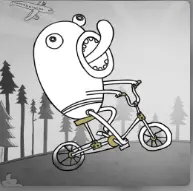
Farting Flight is a comedy arcade physics game about sending Doofus down a dangerous mountain and trying to keep the run alive for as long as possible. Instead of flying with clean aircraft controls, you rely on momentum, slope angles, ragdoll movement, and fart-powered boosts that can either save the run or send the character into an even stranger crash.
The game is not a normal racing game or a standard endless runner. The fun comes from messy movement. A good launch helps, but the run can change quickly when Doofus bounces off terrain, hits a strange obstacle, catches a boost, or tumbles into a new path. That makes each attempt feel less like repeating a fixed level and more like managing a chain reaction.
Stars give the game its progression loop. You collect them during runs, then use them to improve launch power, bounce distance, air control, boost strength, or unlock odd vehicles and items. Short attempts still matter because every run can push your next launch a little farther.
Distance Run
How to Play Farting Flight
The main goal is simple: travel as far as possible before the run fully stops or crashes. The challenge is deciding when to use input and when to let the physics carry Doofus forward.
- Start the run by launching Doofus from the slope. A stronger opening gives you more speed before the first fall.
- Watch the terrain instead of pressing constantly. Hills, pits, ramps, and obstacles can redirect the character without extra input.
- Use fart boosts when Doofus is airborne, losing speed, or about to fall into a bad position.
- Collect stars whenever the path allows it, but do not ruin a strong run by chasing every risky star.
- Spend stars on upgrades that improve distance first, especially launch strength, boost power, bounce distance, and air control.
Mouse / Keyboard / Touch
Controls
Flight Strategy
How to Fly Farther Without Wasting Boosts
Farting Flight looks random, but better runs usually come from cleaner boost timing and smarter upgrades. The key is not pressing every time something happens.
- Save boosts for moments when Doofus is slowing down, falling into a pit, or needs extra height to stay alive.
- Do not boost too early after launch. Let the first slope and bounce create free momentum before spending your strongest input.
- Upgrade distance-related stats before cosmetic unlocks. Better launch speed and bounce control usually create more stars over time.
- Treat bad crashes as information. If one section always kills the run, enter it with more speed or hold your boost until that point.
- Smooth landings matter. A small bounce that keeps movement going is often better than a huge launch that flips Doofus into a dead stop.
FAQ
Farting Flight FAQ
What is the goal of Farting Flight?
The goal is to launch Doofus downhill and travel as far as possible while collecting stars, using boosts, avoiding bad crashes, and improving your upgrades between runs.
What do stars do in Farting Flight?
Stars are used for progression. They help unlock or improve upgrades such as launch power, bounce distance, air control, boost strength, and special items.
Is Farting Flight more about skill or luck?
Both matter. The physics can create unpredictable moments, but better boost timing, upgrade choices, and terrain reading make longer runs more consistent.
What controls does Farting Flight use?
The game mainly uses the Left Mouse Button or Spacebar on desktop. On mobile, you can tap the screen to launch, boost, and interact with prompts.
What should beginners upgrade first?
Beginners should focus on upgrades that help distance, such as launch strength, boost power, bounce distance, and air control, before spending heavily on cosmetic or novelty unlocks.